Windows Desktop App · Live Now

Market depth, volume, and trades — rendered in real-time 3D

Trade3Dx turns live and locally recorded order-book activity into a synchronized depth heatmap with 2D and 3D trade visualization, BBO context, volume profiles, DOM panels, CVD, and selectable inspectors.

Start 7-Day Free Trial View App Screenshots

Payment method required · No charge today · Cancel before day 7

<1ms
Render latency per frame
2D/3D
Independent chart profiles
Separate
Runs outside NinjaTrader 8

Depth, executed flow, and price context in one workspace

Trade3Dx combines live and recorded market-depth data with trade-flow analytics, selectable inspectors, and independently configurable 2D and 3D chart modes.

HM

Live & Archived Depth Heatmap

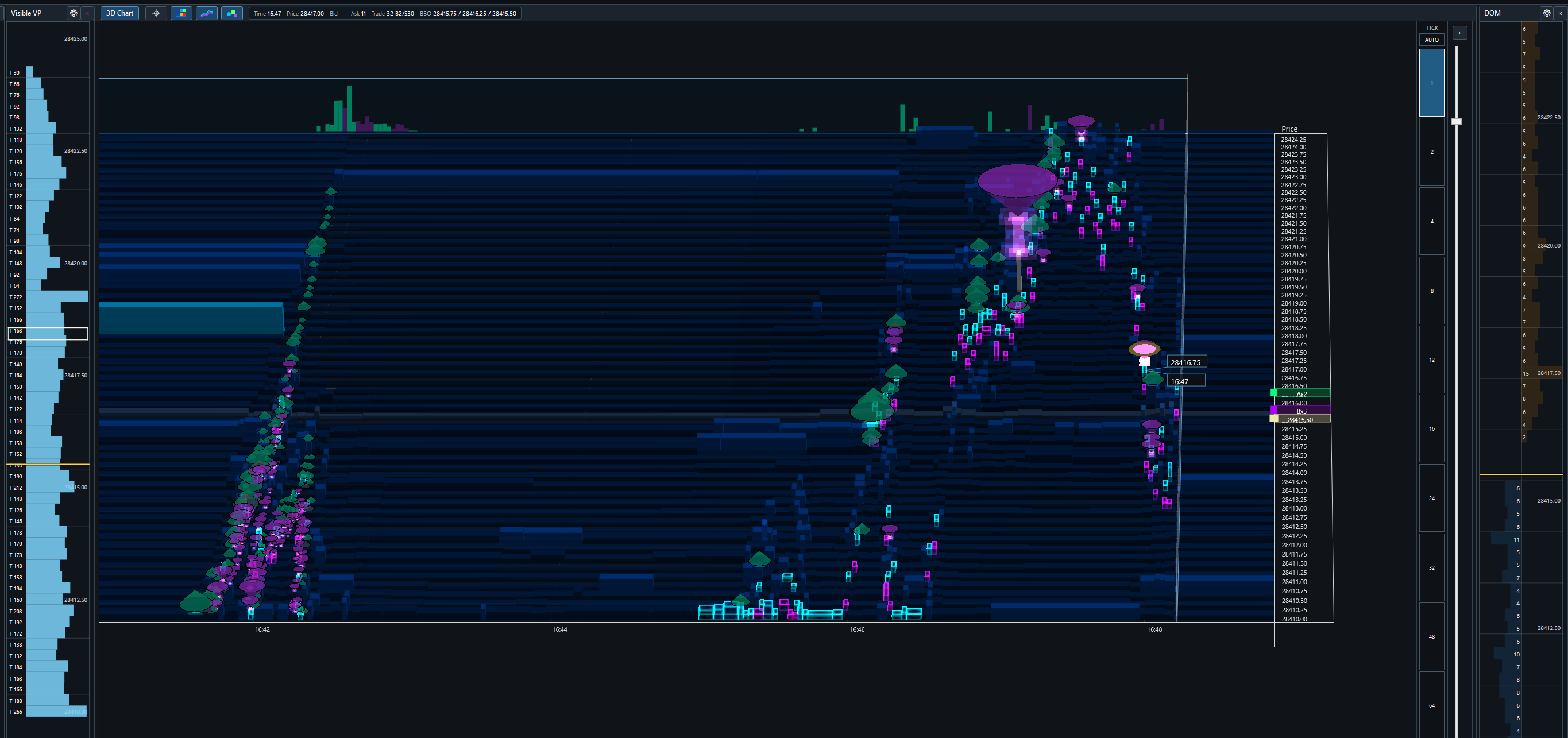
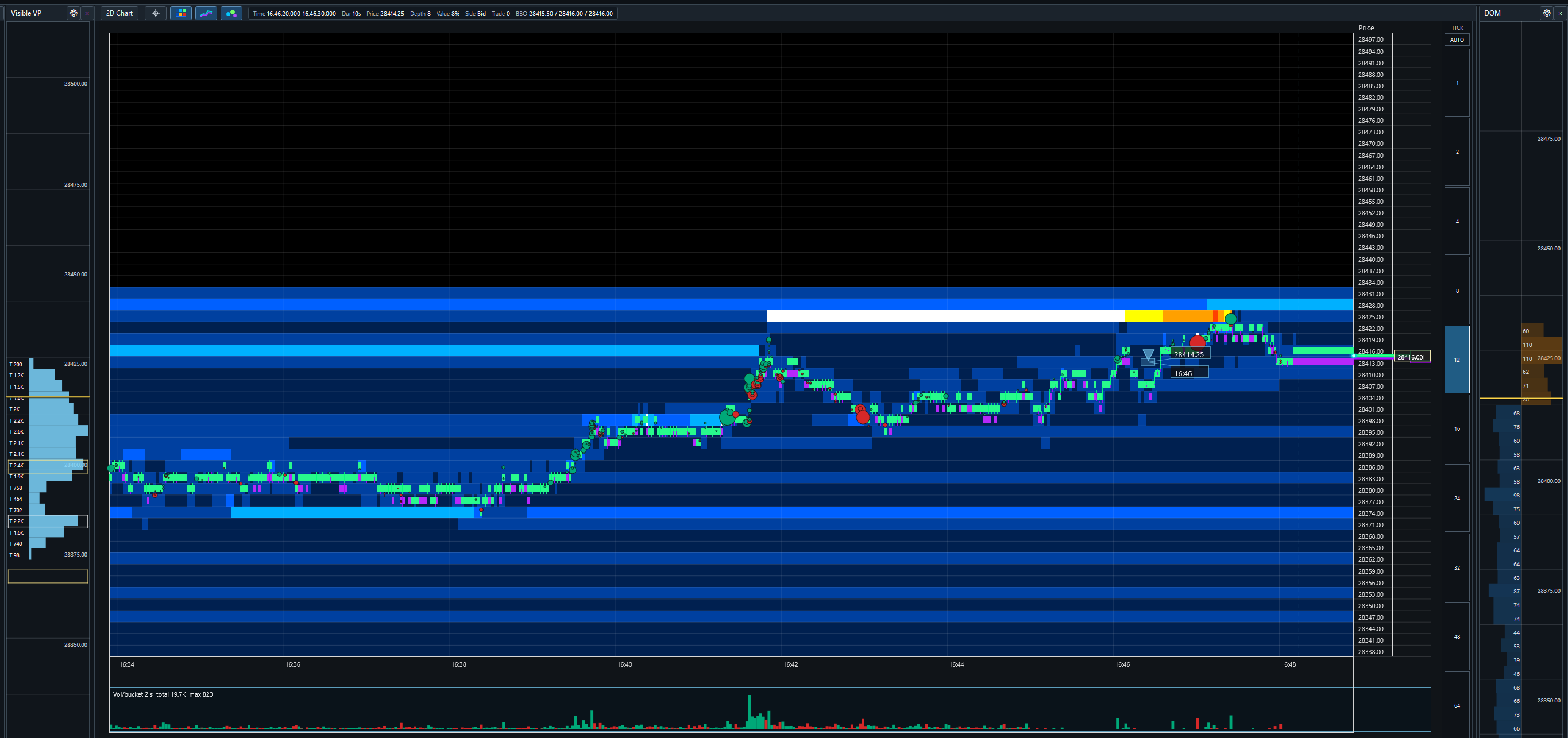
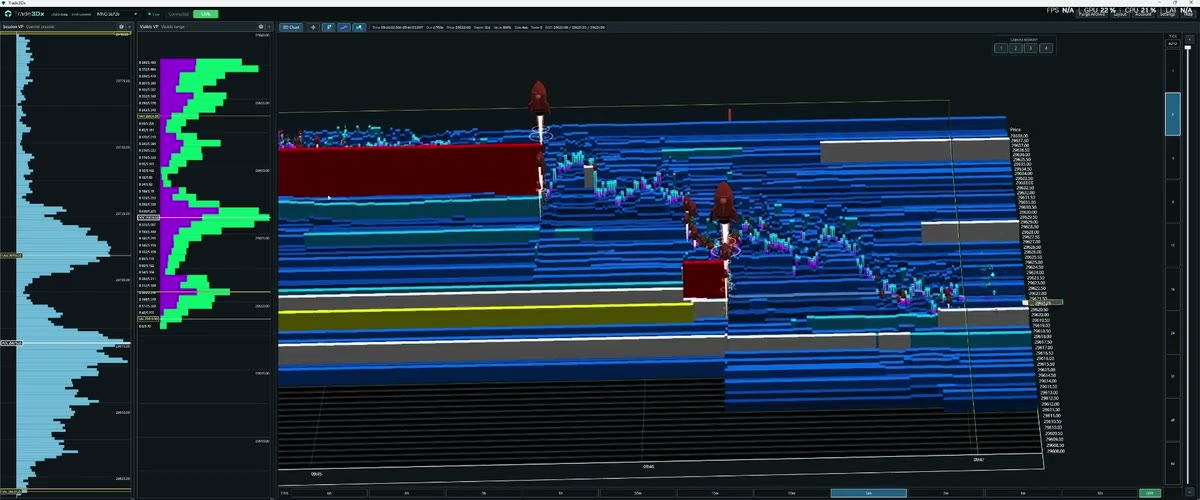
Resting depth is mapped across price and time with configurable intensity buckets. Toggle between a flat 2D surface and a projected 3D view with depth extrusion.

3D

Volume-Scaled Trade Markers

Executed trades retain side, price, time, and quantity. Marker bodies scale with volume, while rocket thrust and height extensions reveal how many price levels a sweep consumed.

BBO

BBO & Last-Trade Context

Continuous best-bid and best-offer history stays aligned with the heatmap and trade markers in live and archive views, with current-price and last-trade markers at the chart edge.

VP

Visible & Session Volume Profiles

Separate profiles summarize executed volume for the current viewport and the trading session. Each panel has its own width, price aggregation, colors, and session lookback.

DOM

Current & Aggregated DOM

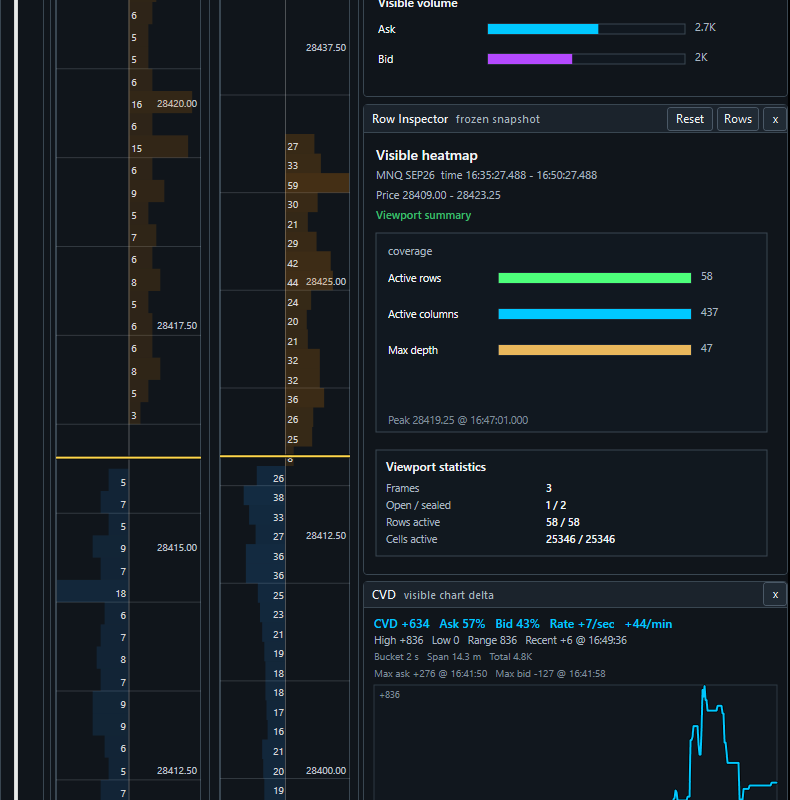
Compare the current depth book with an aggregated depth view in independent price-aligned panels. Linked hover, price scaling, and current-price highlighting keep the panels readable.

REC

Recorded Archive Navigation

Trade3Dx records depth, BBO, and trade events locally. Pan and zoom through available history, switch time intervals, inspect archived rows, and return to live follow without exporting data.

INS

Trade & Row Inspectors

The Trade Inspector summarizes visible ask/bid volume, marker counts, price range, and largest print. The Row Inspector reconstructs depth, adds, removes, executions, refills, BBO state, and source completeness.

CVD

CVD & Flow Rate Analytics

The selectable CVD panel shows visible-chart delta, ask/bid share, rolling rate per second, rate per minute, recent delta, high/low range, and side-colored momentum.

UI

Price-Aligned 2D/3D Workspaces

Show or hide DOMs, volume profiles, CVD, and inspectors in a fixed, automatically arranged workspace. The chart uses 75% of the workspace, with visible side panels sharing 25%. DOMs and profiles stay aligned to the chart’s price scale.

Up and running in minutes

Trade3Dx runs alongside NinjaTrader 8 as a separate window. Setup takes less than five minutes.

Step 1

Install Trade3Dx

Download and run the installer. Trade3Dx is a standalone Windows app — no plugins to install inside NinjaTrader, no configuration files to edit.

Step 2

Connect to NinjaTrader 8

Open NinjaTrader 8 with an active data connection. Trade3Dx picks up your live market data automatically in the background.

Step 3

Select Your Instrument

Choose the futures or equity instrument you want to watch. The heatmap, overlays, and volume panels populate immediately with live data.

Step 4

Trade with Full Context

Read live order-book depth, watch trades print in 2D or 3D, and pan through locally recorded history without leaving the Trade3Dx workspace.

Install Trade3Dx and connect NinjaTrader 8

Download the desktop application and, when needed, the NinjaTrader 8 bridge. Your activation code remains tied to your subscription when reinstalling.

Trade3Dx Windows Installer

The main desktop application for Windows 10 and Windows 11. Customers still need an activation code from checkout before licensed features unlock.

Download Trade3Dx

Up to five installer download sessions per internet connection in a rolling 24 hours. Retries and resumptions are supported for 30 minutes, subject to a transfer allowance.

NinjaTrader 8 Bridge

The NT8 bridge package for routing live market data into Trade3Dx. Install this alongside NinjaTrader 8 when the bridge is not already present.

Download NT8 Bridge

Simple, transparent pricing.

Try Trade3Dx free for 7 days. A payment method is required; cancel before the trial ends and you will not be charged.

7-Day Free Trial
Trade3Dx
$29.95
7 days free · then $29.95/month

  • Full Trade3Dx standalone Windows application
  • Live depth heatmap with real-time order book data
  • 3D trade visualization with size encoding
  • Best bid/offer overlays, depth histogram, volume profiles
  • 48-hour scrollable market history
  • Flexible, resizable panel layout
  • All new features as they ship
  • Email support within 1 business day

🔒 Secure checkout · No charge today · Trial access starts immediately

Payment method required. Unless you cancel before the 7-day trial ends, you authorize Stripe to charge $29.95 automatically and every month thereafter until canceled. Cancel before a renewal to avoid the next charge.

Your 7-day trial has started.

Verifying your trial and preparing your activation code...

Windows only · Runs lean

OS
Windows 10 / 11 (64-bit)
GPU
Any modern dedicated or integrated GPU
Data Source
NinjaTrader 8 with an active data feed
Disk
~500 MB per instrument for 48-hr history

Common questions

Is this a NinjaTrader plugin?

No — Trade3Dx is a completely separate Windows application. NinjaTrader 8 runs alongside it and provides the live market data feed. Trade3Dx handles all the visualization in its own window, independently.

What data feeds are supported?

Trade3Dx is designed to work with NinjaTrader 8 connections that supply supported Level 2 market-depth data. Availability, depth, timestamps, permissions, and compatibility vary by broker, provider, instrument, and subscription. You are responsible for obtaining and maintaining the required market-data entitlements.

How does the 48-hour history work?

Trade3Dx automatically saves your market data in the background while it runs. You can scroll back through up to 48 hours of depth, trades, and overlays at any time — no manual recording or export required.

Can I cancel my subscription?

Yes — you can cancel any time from your account dashboard. Cancel before the 7-day trial ends to avoid the first charge. After billing begins, you'll keep access through the end of your current billing period and won't be charged again.

Can I use Trade3Dx on multiple computers?

Your subscription covers one machine. If you need to move to a new computer, contact support and we'll take care of it.

Does Trade3Dx affect my trading platform performance?

Trade3Dx runs as a separate application and does not submit or route orders. Like any real-time visualization software, it uses CPU, GPU, memory, disk, and a local bridge connection, so performance can vary by system, settings, data rate, and other running applications. Test it in your environment before relying on the same computer for live trading.

What is your refund policy?

The 7-day free trial lets you test Trade3Dx before billing begins. Subscription charges are generally non-refundable after a billing period starts, except where required by law or for a verified billing error. See the Refund and Cancellation Policy.

Follow Trade3Dx and connect with other traders

Watch product walkthroughs and market-visualization demos on YouTube, or join the Discord community for discussion and updates.

Risk, data, and product disclosures

Risk disclosure

Futures and forex trading involves substantial risk and is not suitable for every investor. You may lose all or more than your initial investment. Only risk capital—money you can afford to lose without jeopardizing your financial security or lifestyle—should be used. Past performance is not necessarily indicative of future results.

Software, not advice

Trade3Dx is market-data visualization and analysis software. It does not execute trades, hold customer funds, provide brokerage services, or provide investment, legal, tax, or trading advice. Nothing displayed is an offer, solicitation, recommendation, or guarantee of any trading outcome.

Customer-supplied market data

Trade3Dx does not sell, provide, or redistribute market data. You must obtain and maintain all subscriptions, permissions, and exchange or provider entitlements required for the data you use. Data received from your provider is processed and temporarily stored on your device for visualization. You may not use Trade3Dx to redistribute, publish, export, or provide that data to another person unless you have all required rights.

Data and technology

Market data, order-book information, calculations, reconstructed history, and visualizations may be delayed, incomplete, unavailable, or inaccurate. Trade3Dx is not a system of record and must not be the sole basis for an order or trading decision. Software, hardware, provider, and network interruptions can occur. Confirm material information through your broker and data provider.

Independent product

Trade3Dx is independently developed and is not affiliated with, sponsored by, endorsed by, or an agent of NinjaTrader, Stripe, any broker, exchange, market-data provider, or other third party. References to third parties identify compatibility or services only. Their names, marks, data, software, and other rights remain the property of their respective owners.

No warranties; limitation of liability

To the maximum extent permitted by applicable law, Trade3Dx is provided “as is” and “as available,” without warranties of accuracy, availability, merchantability, fitness for a particular purpose, or non-infringement. Trade3Dx and its owners, developers, and service providers are not liable for trading losses, lost data or profits, business interruption, or indirect, incidental, special, consequential, or punitive damages arising from use of or inability to use the software or website.