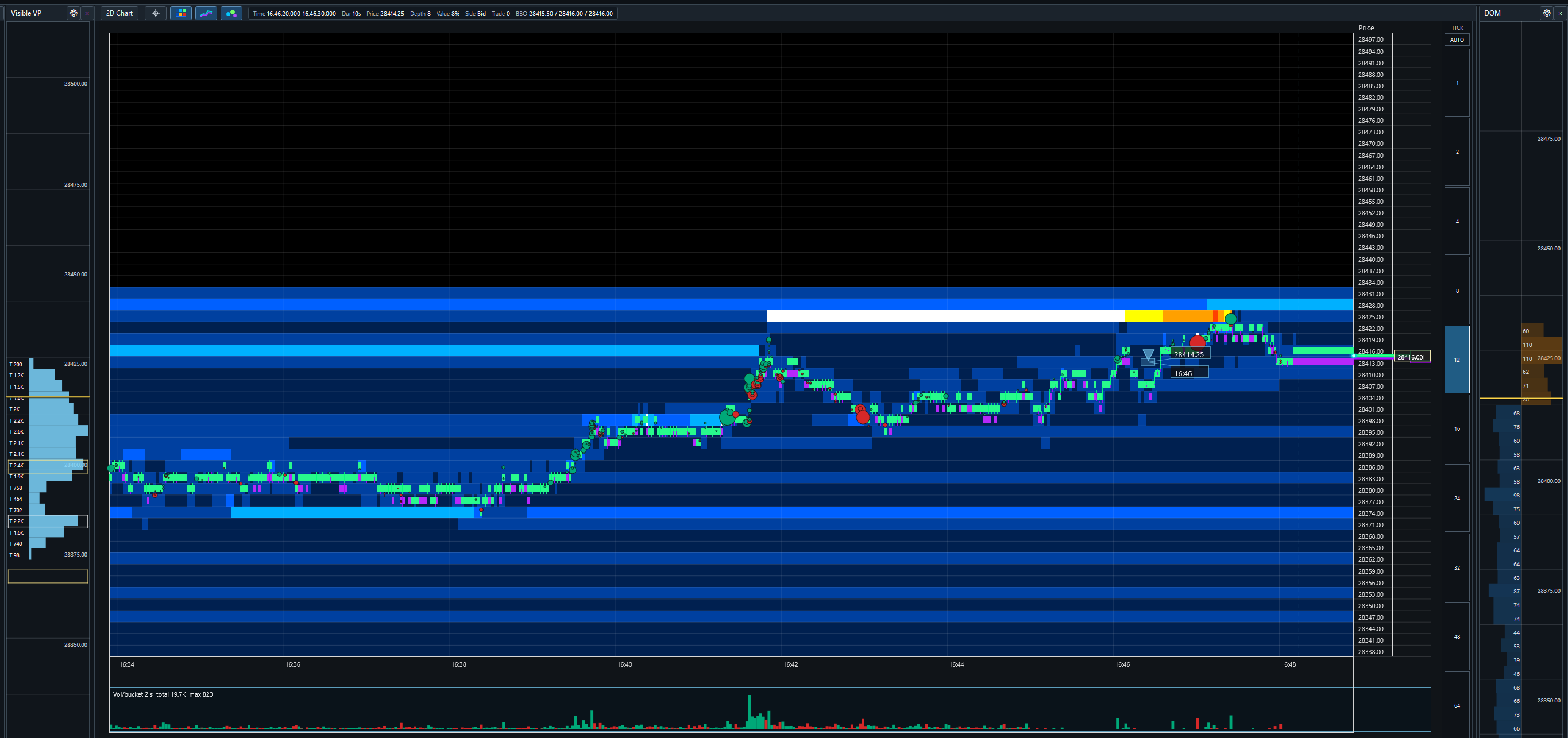
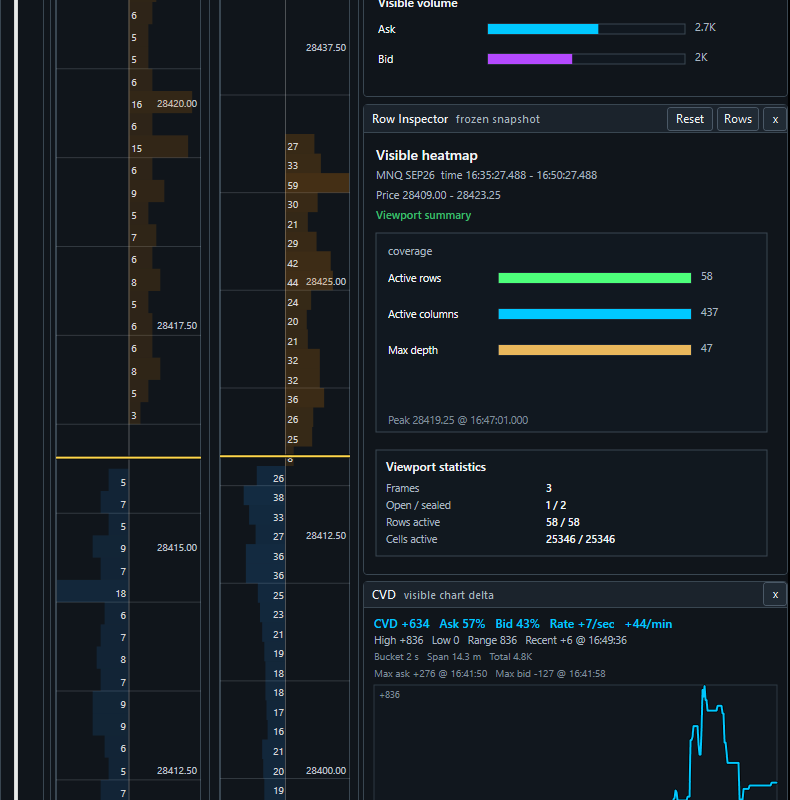
Trade3Dx turns live and locally recorded order-book activity into a synchronized depth heatmap with 2D and 3D trade visualization, BBO context, volume profiles, DOM panels, CVD, and selectable inspectors.
Payment method required · No charge today · Cancel before day 7
Trade3Dx combines live and recorded market-depth data with trade-flow analytics, selectable inspectors, and independently configurable 2D and 3D chart modes.
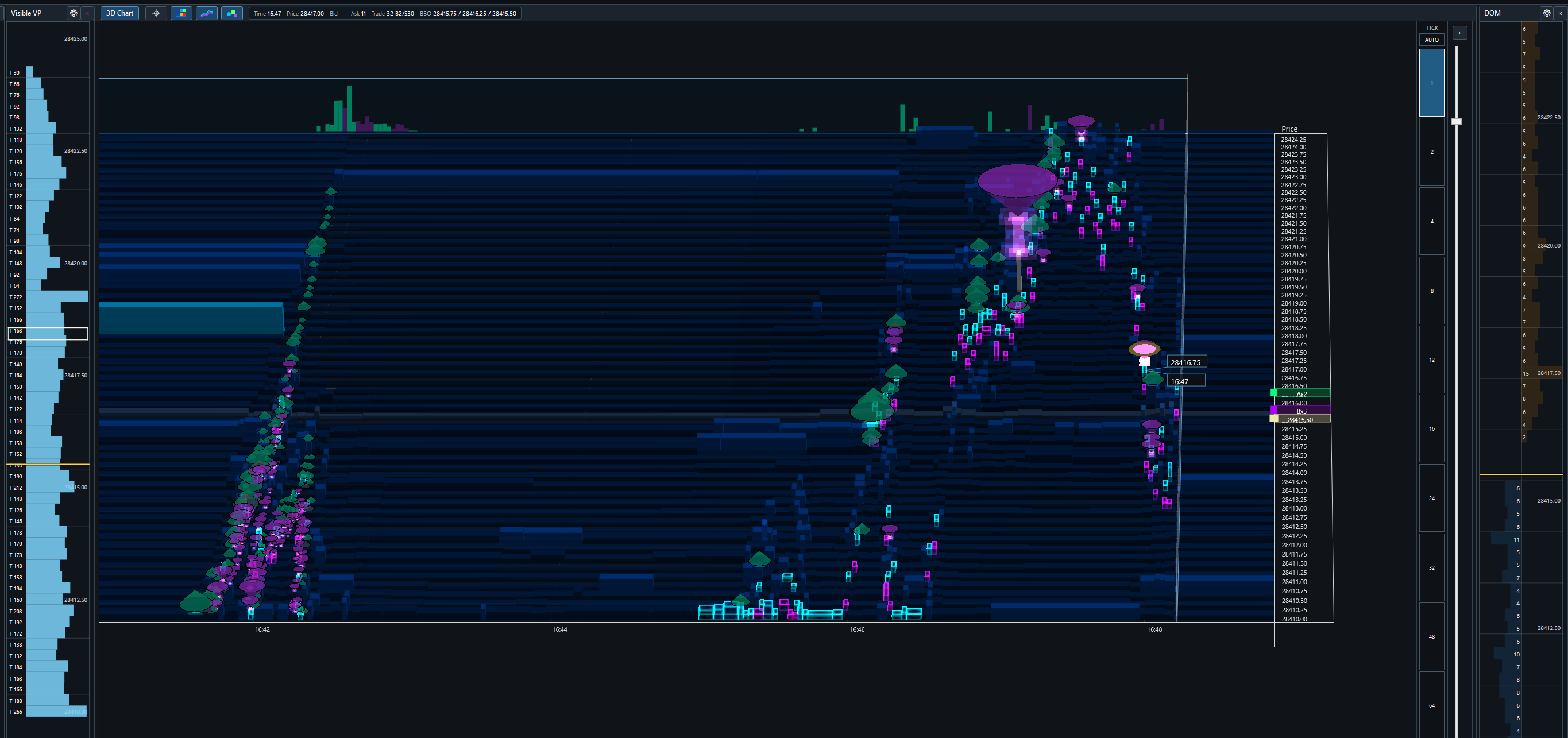
Resting depth is mapped across price and time with configurable intensity buckets. Toggle between a flat 2D surface and a projected 3D view with depth extrusion.
Executed trades retain side, price, time, and quantity. Marker bodies scale with volume, while rocket thrust and height extensions reveal how many price levels a sweep consumed.
Continuous best-bid and best-offer history stays aligned with the heatmap and trade markers in live and archive views, with current-price and last-trade markers at the chart edge.
Separate profiles summarize executed volume for the current viewport and the trading session. Each panel has its own width, price aggregation, colors, and session lookback.
Compare the current depth book with an aggregated depth view in independent price-aligned panels. Linked hover, price scaling, and current-price highlighting keep the panels readable.
Trade3Dx records depth, BBO, and trade events locally. Pan and zoom through available history, switch time intervals, inspect archived rows, and return to live follow without exporting data.
The Trade Inspector summarizes visible ask/bid volume, marker counts, price range, and largest print. The Row Inspector reconstructs depth, adds, removes, executions, refills, BBO state, and source completeness.
The selectable CVD panel shows visible-chart delta, ask/bid share, rolling rate per second, rate per minute, recent delta, high/low range, and side-colored momentum.
Show, hide, dock, and resize the chart, DOMs, profiles, CVD, and inspectors. Layout and visual settings persist, with separate profiles for the flat and projected chart modes.
These are direct snapshots of the current Windows build connected to live MNQ data—not illustrations or rendered mockups.
Trade3Dx runs alongside NinjaTrader 8 as a separate window. Setup takes less than five minutes.
Download and run the installer. Trade3Dx is a standalone Windows app — no plugins to install inside NinjaTrader, no configuration files to edit.
Open NinjaTrader 8 with an active data connection. Trade3Dx picks up your live market data automatically in the background.
Choose the futures or equity instrument you want to watch. The heatmap, overlays, and volume panels populate immediately with live data.
Read live order-book depth, watch trades print in 2D or 3D, and pan through locally recorded history without leaving the Trade3Dx workspace.
Download the desktop application and, when needed, the NinjaTrader 8 bridge. Your activation code remains tied to your subscription when reinstalling.
The main desktop application for Windows 10 and Windows 11. Customers still need an activation code from checkout before licensed features unlock.
Download Trade3DxThe NT8 bridge package for routing live market data into Trade3Dx. Install this alongside NinjaTrader 8 when the bridge is not already present.
Download NT8 BridgeTry Trade3Dx free for 7 days. A payment method is required; cancel before the trial ends and you will not be charged.
🔒 Secure checkout · No charge today · Trial access starts immediately
Payment method required. Unless you cancel before the 7-day trial ends, you authorize Stripe to charge $29.95 automatically and every month thereafter until canceled. Cancel before a renewal to avoid the next charge.
Verifying your trial and preparing your activation code...
No — Trade3Dx is a completely separate Windows application. NinjaTrader 8 runs alongside it and provides the live market data feed. Trade3Dx handles all the visualization in its own window, independently.
Trade3Dx works with NinjaTrader 8 connected to any broker or data provider that supplies Level 2 (market depth) data. This covers most major futures instruments via CQG, Rithmic, and similar professional data feeds.
Trade3Dx automatically saves your market data in the background while it runs. You can scroll back through up to 48 hours of depth, trades, and overlays at any time — no manual recording or export required.
Yes — you can cancel any time from your account dashboard. Cancel before the 7-day trial ends to avoid the first charge. After billing begins, you'll keep access through the end of your current billing period and won't be charged again.
Your subscription covers one machine. If you need to move to a new computer, contact support and we'll take care of it.
No. Trade3Dx runs as a completely separate application. It does not run inside NinjaTrader and has no effect on order execution or NinjaTrader's own performance.
We offer a 7-day refund if Trade3Dx doesn't run correctly on your system and support is unable to resolve the issue. Cancel any time to stop future charges.
Futures and forex trading involves substantial risk and is not suitable for every investor. You may lose all or more than your initial investment. Only risk capital—money you can afford to lose without jeopardizing your financial security or lifestyle—should be used. Past performance is not necessarily indicative of future results.
Trade3Dx is market-data visualization and analysis software. It does not execute trades, hold customer funds, provide brokerage services, or provide investment, legal, tax, or trading advice. Nothing displayed is an offer, solicitation, recommendation, or guarantee of any trading outcome.
Market data, order-book information, calculations, and visualizations may be delayed, incomplete, unavailable, or inaccurate. Software and network interruptions can occur. Confirm material information through your broker and data provider before making a trading decision.
References to NinjaTrader, Stripe, brokers, exchanges, and data providers identify compatibility or third-party services only and do not imply sponsorship or endorsement. Third-party names and trademarks belong to their respective owners.
Review the CFTC futures-market guidance and NinjaTrader regulatory disclosures.